
How to Deposit Solana to Your Zora Wallet
Depositing funds to your Zora wallet allows you to enjoy seamless, gas-free trading across Zora's web and mobile app.
IMPORTANT: Your Solana deposit address only supports native SOL on Solana mainnet. Any SPL tokens (such as USDC, or other Solana-based tokens) sent to your Solana deposit address will be lost and cannot be recovered.
Depositing SOL to your Zora wallet
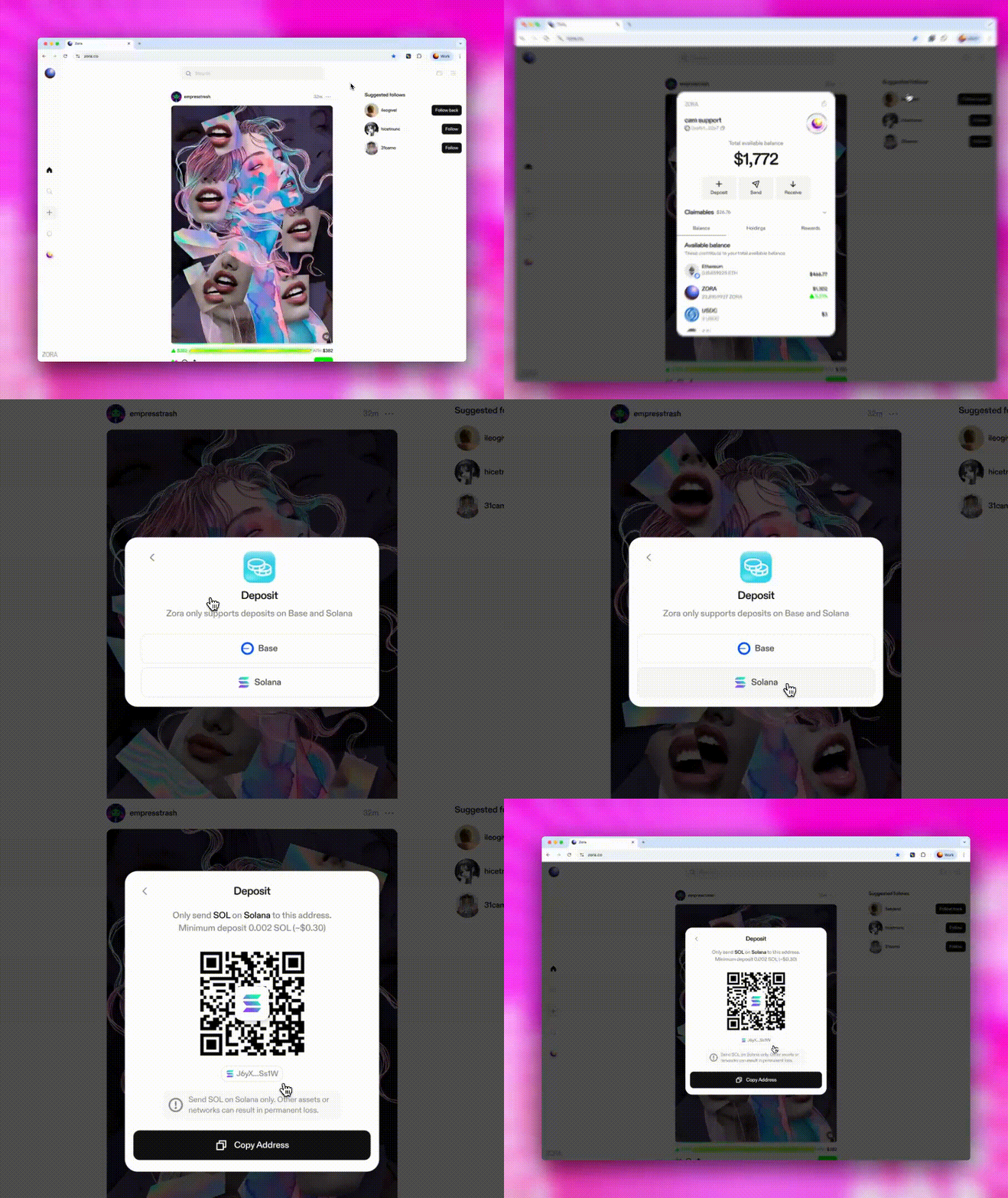
Navigate to your wallet view by tapping on the wallet icon
Select “Deposit”
Tap on “Solana” from the network deposit selector
Tap on the “Copy address” button to copy your Solana deposit address
In your preferred wallet app, use its send feature
Paste in your Solana deposit address as the recipient
Enter the amount of SOL you wish to deposit
**IMPORTANT**: A minimum deposit amount of 0.002 SOL is required
Confirm the transaction in your wallet
Once the transaction is confirmed, your deposit will be available in your Zora wallet as SOL.
Need help or have some questions?
If you need more help, don't hesitate to contact our support team via our help centre, using the chat bubble on the bottom right, emailing support@ourzora.com, or tagging us on X (formerly Twitter) and Farcaster.